
Effective business intelligence makes organizations more informed and decision driven.
Companies looking for interactive visuals and rapid deployment, Power BI is the best option with its cost-effective, easier, and Microsoft- integrated analytics. On the other hand, Qlik Sense is useful for organizations handling high-volume and complex data modelling, providing in-depth and unlimited data exploration.
Key comparison between Power BI and Qlik Sense revolves around four elements –
- Data engine and exploration
- Usability and learning curve
- Integration and ecosystem
- Pricing and performance
To make it easier for you, see
| Power BI | Qlik Sense |
| You are already a Microsoft shop | You have evolving data modeling needs |
| You need rapid deployment | You need detailed, free-form data analysis |
| You prefer lower costs | Budget is not a constraint in getting an effective analytics engine |
As a matter of fact, your choice of BI tool plays a decisive role in keeping your business intelligence and business strategy in sync.
In the comparison of Qlik Sense vs Power BI, we must realize that both BI tools offer competitive features. Before you think of any other alternatives, we have also compared Power BI vs Tableau and Power BI vs Google Data Studio – consider looking for more clarity.
Power BI predominantly has an edge above other BI tools, given its capabilities to offer intuitive visualizations, AI-driven actionable insights, and effortless integration.
Well, don’t believe what we say – explore for yourself.
By the time you reach the end of this read, you’ll have gained well-rounded insights about –
- What makes Power BI a go to choice?
- How to attain the maximum impact with Power BI?
- What is Power BI & Qlik Sense?
- What are they used for?
- Qlik Sense vs Power BI features comparison
- Key points of disparity between Qlik Sense and Power BI
- How to pick between Power BI and Qlik Sense?
- What is Power BI consulting and what difference does it make?
- Frequently asked questions about Microsoft BI and Qlik Sense
And much more on your way!
Without any further ado, let’s get started with definitions.
What is Power BI?
Power BI is an advanced, cloud-based data visualization platform that converts raw data from various locations (cloud, spreadsheet, on-premise) into interactive dashboards, compelling reports, and actionable insights. It enables users to –
- Visualize data
- Share insights across organizations
- Make data-driven decisions
Interestingly, users don’t need advanced coding skills to use Power BI for reporting needs. Power BI’s powerful features and self-explanatory interface help large, small, and medium businesses to –
- Gather real-time insights
- Make sense of complicated data
- Extend business intelligence value with AI and ML
- Identify trend patterns
- Set up automation
- Perform online analytical processing
- Conduct Ad hoc analysis and reporting
- Utilize complete reporting and data visualization toolset
- Engage with the Q&A question box
- Accelerate decision making
Next, in the comparison between Qlik vs Power BI, it’s time to explore the capabilities of the second contender – Qlik Sense.
What is Qlik Sense?
Qlik Sense is a renowned, advanced business intelligence and data analytics tool, helping users build conversational dashboards and visuals to
- Explore data
- Discover insights
- Make data-driven decisions
Associative Engine, a specialized technology behind Qlik, empowers users to assess relationships between multiple data points without being interrupted by prebuilt paths or queries.
Qlik Sense is a modern and web-based data analysis platform, representing the 3rd-generation BI technology, which means it is the most user-friendly iteration of analytics available today.
With Qlik Sense, users are able to showcase data across various verticals by exploring + discovering + building interactive stories.
Additionally, its flexible design ensures that your visualizations look engaging on every device you use.
Have you made up your judgment?
Don’t rush your decision just yet.
Both BI platforms are robust in their own right and there is a lot you should consider before investing in one.
Next, in decoding your dilemma between Qlik Sense vs Power BI, we will zoom into the important aspects that will take you closer to your decision.
What is Qlik Sense Used For?
Qlik Sense is primarily used by medium and large sized-businesses to –
- Empower their teams with self-service analytics and visualizations
- Create interactive dashboards
- Utilize search and conversational analytics
- Set up alerts and automation
- Generate reports
- Customize and embed analytics
- Perform real-time analytics
- Integrate with Big data sources
- Utilize a rapid development environment
- Access standard APIs
- Collaborate on reports and dashboards
Long story short – Both Power BI and Qlik Sense equip robust business intelligence capabilities and empower businesses to understand, visualize, and share data through different approaches.
Realize that in the tug-of-war between Qlik Sense vs Power BI, the latter aims for businesses of all sizes, with mixed budgets, and requires no strong proficiency, while the former BI platform caters to medium and large enterprises with bigger data storage needs and calls for proficient data professionals.
When we compared the leading business intelligence tools, Qlik vs Tableau vs Power BI, here is what we found.
| BI Platform | Tableau | Power BI | Qlik Sense |
| No. of companies using the product | 120,182 | 97,538 | 14,233 |
| Market share | 16.78% | 13.62% | 1.99% |
Source – Enlyft
Moving on, it’s time to dive deeper, into the face-off of Microsoft Power BI vs Qlik Sense, nail down their features, and help you find “the one” for your BI needs.
Qlik Sense and Power BI – Key Points of Disparity
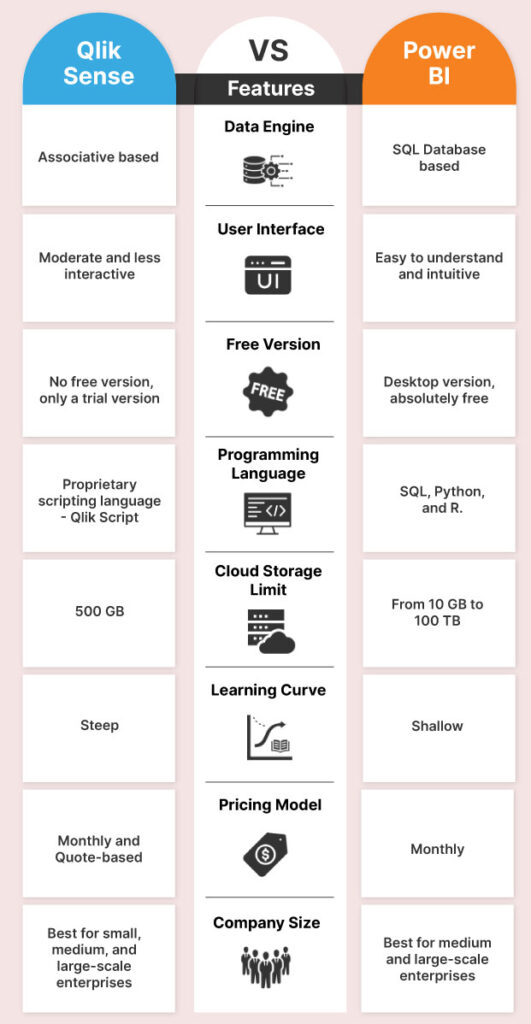
Both Power BI and Qlik Sense are renowned business intelligence tools, in which MS Power BI stands out in user-friendliness, lower pricing, and integration capabilities, whereas Qlik is considered more useful in managing intricate, high-volume, and limitless data exploration tasks.
In simple words,
- Qlik Sense supports flexible, non-linear analysis
- Power BI supports faster, guided, and conversational reporting
Key Comparisons –
Qlik Sense vs Power BI – Here are the Differences
Power BI vs Qlik Sense – Vendor and Ecosystem
Microsoft Power BI offers effortless integration with other Microsoft product offerings, such as Azure, and MS Power Platform, along with non-Microsoft product ranges such as Google Sheets, Salesforce, etc.
Created by Qlik, Qlik Sense is a standalone business intelligence product.
Although Qlik doesn’t share the same level of integration with Microsoft’s product range, it offers standard integration connectivity to a variety of data sources including spreadsheets, data warehouses, cloud-based platforms, and many more.
If your business is heavily invested in the Microsoft ecosystem Power BI is your best choice.
Qlik Sense vs Power BI – Storage Capacity
Power BI provides cloud storage from 10 GB to 100 TB, depending on your subscription plan.
Whereas Qlik Sense provides 500 GB of cloud storage.
Whatever data storage capabilities your business intelligence initiative demands, MS PowerBI may be the best bet, as you can choose from different subscription plans flexibly.
Power BI versus Qlik Sense – Visualization and User-Interface
MS Power BI is considered in the BI market due to its compelling and easy-to-use interfaces, complementing both technical and non-technical business users.
In the same manner, Qlik Sense is a straightforward and clean business intelligence tool, empowering users with multiple technical capabilities to effortlessly communicate with the tool.
Yet, Power BI stands unbeatable in this category for delivering superior user experience.
MS Power BI vs Qlik Sense – Supported Devices
Power BI supports all three devices –
- Windows
- Android
- iOS
When users want the data to be maintained on premises instead of using the cloud, then they would need Power BI Desktop for Power BI Report Server.
In the case of Qlik Sense, users must install Qlik Sense Enterprise on-Prem for storing data on premises. Qlik Sense also supports web-based platforms as well as iOS, Android, and Windows.
Decoding your dilemma of Microsoft Power BI vs Qlik Sense, device compatibility plays a significant role, and both BI tools offer extensive support for various devices.
Qlik Sense vs Power BI – Reporting
Both tools offer strong reporting features.
Creating and distributing reports in MS Power BI is both easy and rewarding for all users from diverse technical backgrounds, thanks to Power BI’s drag-and-drop interface and self-explanatory features.
Power BI’s drag-and-drop interfaces and self-explanatory features make it easier to build and distribute reports for both technical and non-technical business users.
Qlik, in contrast, enables users to add charts and graphs to create in-depth reporting.
The winner of this category is subjective and depends on your business’s specific reporting and distributing preferences.
Qlik vs Power BI – Mobile App
Both Power BI and Qlik Sense provide mobile apps with a flexible design and offline access to
- iOS
- Android
Not only this, users like you can easily see reports and dashboards on mobile devices with –
- Ease of use
- Data protection
- Real-time collaboration
The Power BI Mobile App is best used to monitor and access your Power BI data on the go.
Whether the data is on-premises or in the cloud, you may view and interact with all Power BI reports and dashboards, share them with your team and discover insights within minutes.
Qlik Sense also walks in with a Qlik Sense Mobile SaaS app for iOS and Android mobile devices that allows users who have been allocated User access, or a Professional or Analyzer access license to connect while restricting anonymous access.
Both the BI platforms Power BI and Qlik Sense pose equal competition when it comes to providing mobile accessibility and protecting data while supporting real-time collaboration. Thus, the winner of this bracket depends on your business preference and additional features.
Qlik vs Power BI – Pricing
Lastly, in the discussion around Qlik Sense vs Power BI, we have the biggest deciding factor – Pricing.
| Power BI Plan | Pricing |
| Power BI Desktop | Free |
| Power BI Pro | $10 per user/month |
| Power BI Premium Per User | $20 per user/month (If using Microsoft 365, then it’s free) |
| Power BI Premium | $4995 per month for P1 SKU |
Qlik Sense Pricing –
| Qlik Sense Plan | Pricing |
| Qlik Sense Trial | 30-day free trial |
| Qlik Sense Business | $30 per user/month |
| Qlik Sense Enterprise SaaS | Quote-based |
Power BI is superior in this category due to its clear and straightforward pricing model.
Dig deeper – Find Your Fit by Learning Power BI Cost, Benefits, and More.
Phew! That was quite a comparison between Qlik Sense vs Power BI.
This in-depth Power BI vs Qlik Sense comparison will move you close to your decision.
Expert Quote – “As businesses moved from static reporting to real-time decision-making, analytics platforms evolved to support different priorities. While Qlik Sense became known for flexible data exploration, Microsoft Power BI emerged as a preferred choice for enterprises seeking seamless Microsoft integration, AI-powered insights, and scalable analytics,” says Peter Grigg (25+ years of experience in Microsoft)
Moving on, it’s time to explore the pluses and minuses of the BI tools in question.
Power BI vs Qlik Sense – Pros and Cons of Two Major Analytics Solutions
Power BI is ideal for Microsoft-centric organizations needing rapid, cost-effective, and intuitive reporting, while Qlik Sense excels in complex, associative, and unconstrained data exploration. Power BI offers better ease of use, while Qlik Sense provides superior, deep-dive data modeling.
Let’s get going.
Pros and Cons of Qlik Sense
| Pros | Cons |
| Highly scalable platform | Complicated token pricing model |
| Easy collaboration on data projects | Steep learning curve for non-data professionals |
| Robust security features to protect sensitive data | Costlier than some other BI and data visualization tools |
| Best suited for medium and large-sized enterprises | Limited integration options with other business tools and systems |
Pros and cons of Power BI
Pros Cons
| Pros | Cons |
| Free version | Costly to scale |
| Very easy-to-use | Lack of in-memory data processing |
| Backed-by Microsoft | Unjustifiable cost for Power BI Premium |
| Flexible licensing model | Limited capabilities with the Free Version |
| Rich and personalized reports and dashboards | Higher dependency on Microsoft product offerings |
| Seamless integration with Microsoft ecosystem | |
| Customizable visualization and security features |
This was all about the Qlik Sense vs Power BI differences that you should be aware of before arriving at your decision.
Now it’s time to clear the air around the dilemma…
Top Companies Leveraging Qlik Sense and Power BI
Global leaders leveraging Qlik Sense and Power BI for data analytics include major enterprises like Cisco, Hershey’s, Walmart, Adobe, and many other companies which use these platforms for real-time insights, supply chain management, and financial reporting. Both tools are widely adopted for driving actionable intelligence across sectors.
Cisco
Cisco utilizes Qlik Sense to assess massive operational and network data, helping teams with continuous visibility and speeding up decision-making.
Hershey’s
Hershey’s utilizes Qlik Sense with its interactive dashboards to optimize supply chain, sales analytics, boost forecasting, and performance.
Walmart
Walmart utilizes Microsoft Power BI with its real-time dashboards to track sales, inventory, and business performance, helpful in making faster decisions.
Adobe
Adobe utilizes Power BI to convert customer and marketing data into actionable insights, supporting data visualization dn business grade analytics processes.
Qlik Sense vs Power BI – Which is Better?
Power BI is suitable for organizations emphasizing cost-effectiveness, ease, and multi-layered integration with strong AI capabilities. At the same time, Qlik Sense specializes in exploring complex data, handling massive datasets, and uncovering underlying insights with its Associative Engine.
There is no single-word answer to this question. The best approach is to consider the following aspects to find the best fit –
- Your unique data environment and current ecosystem
- Scalability needs and future growth plans
- Volume, variety, and complexity of data processing
- Price factor
- Level of analytical capabilities required
- Level of customization required
- Data security and compliance measures
- Mobile friendliness & accessibility
- In-house and external technical expertise required
- User adoption and training
- Community support
After carefully assessing these factors, you’ll have a thoughtful answer to the question – “Which BI tool fits best for my organization’s BI needs?”
Impressed with the capabilities of Microsoft’s Power BI, have you decided to opt for it?
Cheers!
We are happy to have helped you arrive at your best judgment.
Let’s go! Shall we?
What Makes Power BI a go-to Choice?
According to 6Sense, MS Power BI possess 13.84% of the market share with 53901 users. On the other hand, Qlik Sense has 2.36% industry share with 9206 users.
Power BI is easy to cope with as compared to its competitors. The learning curve for the users is moderate to low – for both technical and non-technical users.
Let’s understand what makes Power BI the first choice for businesses.
Clear Cost Structure with Scalable Options
Cost doesn’t matter when you want nothing less than the best – in this case a business intelligence tool to get your data initiative stated.
But why pay more when you get more for less.
Yes, you read that right. Power BI cost structure is designed to help you stay at the forefront of your data game, without bothering about the cost.
Your data visualization and reporting needs aren’t going to change over time. Power BI offers you the leverage of scale. You can upgrade your Power BI licenses as per your changing needs.
If we compare the Power BI cost structure with that of Qlik Sense, Power BI is more affordable and justifies the total cost of ownership.
- Power BI Free Version – Free
- Power BI Pro – Costs $10/ user, billed per month
- Power BI Premium – Costs $20/user, billed per month
- Power BI Premium – Per Capacity works with custom pricing
Whereas Qlik Sense pricing is significantly rigid in nature and varies based on deployment size & features.
Qlik Sense Business version costs start from $30/user, billed monthly.
The enterprise version includes additional costs that vary depending on capacity, data connectors, and advanced features.
Power BI allows you to start small.
With Power BI versions, the members on your team who are new to the BI landscape can hone their data skills – the first step toward data literacy.
Once you are confident on the usability, you can start with Power BI Pro with a small team and upgrade your Power BI license as your data needs evolve.
Power BI puts you at a cost advantage and lets you ditch the unpredictable licensing troubles.
Intuitive Visualizations with Microsoft Ecosystem Advantage
You know what – Power BI has an unfair advantage.
It’s the Microsoft Ecosystem advantage.
Not to doubt the impeccable data visualization and reporting capabilities of Power BI – but it’s an addition to a well-established IT ecosystem that businesses have been using for years, Microsoft.
It offers intuitive dashboards & compelling visualizations.
If offers AI-powered actionable insights to predict trends & patterns.
It offers seamless integration with Microsoft ecosystem, third-party tools, & databases.
Not just that – quick user adoption & easy learning curve make Power BI compatible to every business environment. Its drag-and-drop interface and natural language query processing makes it even more convenient for non-technical users.
It doesn’t end here either. If you wish to maintain your analytic on-premises for security & governance concerns – Power BI Reporting Server, has you covered. You get to experience the power of the cloud without compromising on compliance.
And together all of this makes Power BI a complete BI tool.
Wish to make the most of your Power BI investments? A reliable Power BI services provider can be of great help.
Skeptical? Unsure what difference would a Power BI partner make?
Next, let’s understand the impact a Power BI service provider helps you achieve.
What Impact Does a Power BI Service Provider Bring in?
“Why bring in Power BI services provider when we have a capable in-house team?”
9/10 CTOs/business leaders think Power BI partners would replace them or make their role redundant.
We often hear this objection during our prospect calls, and here’s our response – “We can’t replace you. Our job is to help you succeed with your BI initiative and empower your team with the advanced Power BI skills.”
Let’s understand how we’ve helped our customers across industries with the different Power BI services we offer.
Power BI Consulting Services
Our Power BI consulting services are designed to help empower your team to get on their feet with advanced Power BI features & capabilities.
The goal is to make your in-house team self-sufficient and direct your data-first initiative in the right direction.
Let’s understand how we help you attain this with a real-time use case.
There was a Retail Chain, existent at multiple locations, struggling to get a hold of their data.
Problem
They relied heavily on the excel-based reporting for sales tracking & analytics for individual stores. There was no centralized visibility for sales data. They had recently invested in Power BI, but lacked expertise on advanced capabilities, in-house.
Solution
Our team of Power BI consultants assessed their Power BI data visualization needs, and overall technical understanding on using the solution.
We helped –
- Identify reporting bottlenecks with root causes
- Set up a centralized dashboard across stores, which would sync in real time
- Their in-house team of Power BI users develop data literacy & trained them on Power BI advanced data visualizations & reporting
Result
As a result, they were able to achieve an integrated data environment with –
- 70% increased visibility into sales data, store inventory & customer behavior
- A well-equipped in-house team with apt Power BI skills
- 50% reduced time in manual report creation
The above results can be achieved when you have a dedicated and skilled partner like Integrative Systems by your side.
“Data leads, drives, and impacts every decision you make. And we will tell you where exactly you are heading with your data,” says Peter Grigg (25+ years of Microsoft Experience)
How is Integrative Systems the best Power BI Consulting Services?
The best time to engage with a Power BI consultancy is when you are aware of the BI challenges that need attention, but cannot get the answers.
Not all challenges need the attention of professional Power BI service providers.
But when there is growing complexity, unsatisfactory results, constant struggle, or pressure to deliver prompt insights, it’s ideal to seek professional help.
We bring you top scenarios where investing in Power BI service provider makes a great choice.
Let’s look at them one-by-one!
When You Need to Leverage Advanced Analytics
Hands down, no BI tool is as easy as Microsoft Power BI.
It is designed for non-technical and technical users alike to gain micro and macro views through customized dashboards.
But the same users may get lost in the intricacies of its advanced analytics.
While it allows users to go deep into the visualizations, ask questions to the data, integrate with Azure machine learning, and whatnot, exploring these features can be overwhelming.
This is when a professional Power BI service provider comes to your rescue.
What Changes When You Engage with a Power BI consulting company?
It grants you access to pre-vetted Power BI experts who understand the tool inside and out.
They make the best use of advanced analytics to –
- Uncover hidden trends and patterns
- Anticipate changes and predict future demands
- Build dynamic dashboards to track real-time performance
- Automate reporting and data workflows for better efficiency
The consultants go beyond mere implementation and train your team, to ensure everyone can make the most of Power BI’s advanced analytics, irrespective of their skill level.
When You Want to Scale Your Business Intelligence Efforts
Next best time to invest in Power BI is when you are ready to make a jump from basic reporting to scalable solutions.
This may happen when your business is expanding to new territories, you are planning to expand your team, launching a new product range, integrating multiple data sources across departments, etc.
At this stage, you need solid support for your growing data needs.
What Changes with a Power BI Consulting Company?
With the right PBI consultants, you gain valuable support to expand your business intelligence and data visualization efforts.
They help you by –
- Introducing best practices to avoid hiccups
- Empowering your team to create compelling visualizations
- Ensuring smooth data integration from multiple data sources
- Assessing your current usage and guide on Power BI licenses
- Analyzing your current processes to find areas for improvement
- Implementing best security measures to protect your Power BI data
- Automating the process of report & dashboard creation and distribution
- Personalizing the platform and customizing the data models to meet your evolving data needs
- Providing regular Power BI support and maintenance for operational excellence
With their help, you’ll be up and running, scaling your business operations while scaling your business intelligence efforts.
When You Don’t Have Access to Power BI Developers
You are invested in Power BI but making bare minimum of it, because you don’t have access to proficient Power BI developers.
Is that the case with you?
Without skilled professionals you miss the whole point of what Power BI can do for your business.
With Power BI experts, you can anticipate market trends, understand consumer behavior, grab opportunities before your competitors do, etc. But without them, you’re stuck at level 1!
What Changes When You Engage with a Power BI Consulting Company?
We start by helping you succeed first by ensuring your project deliverables are SMART (Specific, Measurable, Achievable, Relevant, and Timely).
Our Power BI expert/s can work as an extension of your in-house team by –
- Multiplying your capabilities
- Adapting to the in-house team’s working style and environment
With their help, you’ll move up from just creating reports and staring at it to truly leveraging Power BI insights for strategic decision-making.
At last, determining the best times to invest in Power BI consulting may differ as each company’s needs and abilities are different.
But one thing is clear – whenever it is important to grow your business, get ahead of your competition, or leverage strategic decision-making, it’s wise to partner with a reliable Power BI consultancy.
With expert professionals on your side, you’re sure to witness a meaningful change in your analytics and decision-making capabilities in just a few months.
This blog is brought to you by Integrative Systems, a reputed Power BI consulting services provider and certified Microsoft Partner based out of Chicago, USA.
Power BI Consultancy of Your Choice
If you’re looking for a Power BI partner with proven expertise to upgrade your BI strategy and drive your business toward success – Team Integrative Systems is worth your attention.
Why should you choose us over others?
Here’s why –
- We’re a recognized Microsoft Partner
- We carry 10+ years of Power BI experience
- We’re honest about what we can do and what we cannot
- We have helped our clients increase their IT ROI from 5% to 30%
- We’ve made it to the INC 5000 list of America’s fastest-growing private companies four times in a row
What makes us stand out in the crowd is – our philosophy doesn’t revolve around repeat business but delivering true value the first time.
Take a look at our range of Power BI services –
- Power BI Implementation and Deployment
- Power BI Dashboard & Report Creation
- Power BI Integration Services
- Power BI Consulting Services
- Power BI Support Services
Think we’re a match made in heaven?
Drop us a line at contact@integrativesystems.com and someone from our team of experts will get back to you within 2 business days to take it ahead from there.
Key takeaways –
Power BI and Qlik Sense are dominating BI tools that share common strengths. However, each has its own unique features.
For businesses with a preference for strong integration with Microsoft’s ecosystem and flexible pricing models, Power BI is an ideal bet. Whereas businesses with large data handling requirements can opt for Qlik Sense.
If your vote goes to Microsoft Power BI, you must explore how Power BI consulting proves to be a game-changer in making the most of your Power BI investments.
Frequently Asked Questions
Is Power BI Better Than Qlik?
Power BI is better than Qlik Sense in multiple ways. Such as – Cost-effectiveness, ease of use, flexible pricing model, variety of customization options, and much more. However, Qlik Sense has its own advantages such as bigger cloud storage and an associative-based data engine.
Is Qlik Sense Good or Bad?
Qlik Sense is good and used by multiple organizations. It’s known for its effective, easy-to-use, and associative data engine, helping users handle complex datasets. But, it has a complex pricing model and need deep learning curve in comparison with Power BI.
What are the Cons of using QlikSense for Business Intelligence initiatives?
Ans- Some of the disadvantages of Qlik include:
- Complicated pricing model
- Steep learning curve
- Limited integration capabilities
What is the Best Data Visualization Tool in 2026?
Ans- Power BI. Due to user friendliness, modern Microsoft 3565 integration capabilities, and AI features, it is one of the best data visualization tools in 2026. Other than this tableau, Qlik Sense, and Looker Studio are also other options. Still, Power BI set itself apart due to affordability and a reasonable pricing model.
qlikview vs qlik sense vs power bi
Power BI – A market leader for affordable, Microsoft-integrated, easier reporting.
Qlik Sense – Helps in exploring data via its associative engine
QlikView – A powerful, user-centric tool for legacy guided analytics.

2 Comments to “Power BI vs. Qlik Sense – Why Power BI is the Smarter Bet?”
Mary Kalina
Great comparison! I appreciate the detailed analysis of both Qlik Sense and Power BI. It’s fascinating to see how their unique features cater to different user needs. The pros and cons section was particularly helpful in making my decision. Thanks for sharing such valuable insights!
Barb
Great comparison! I’ve been trying to choose between Qlik Sense and Power BI for my team, and your insights on user interface and data visualization capabilities really helped clarify things. I appreciate the pros and cons listed for each tool; it made my decision-making process a lot easier. Looking forward to more posts on BI tools!